Features

A website with an admin panel you will actually use

Every Creatin Web site is a website with an admin panel: a dashboard in your browser and an Android app on your phone. This page shows every feature, with real screenshots of the dashboard and the app.

We build the website. These are the tools you use to run it afterwards.

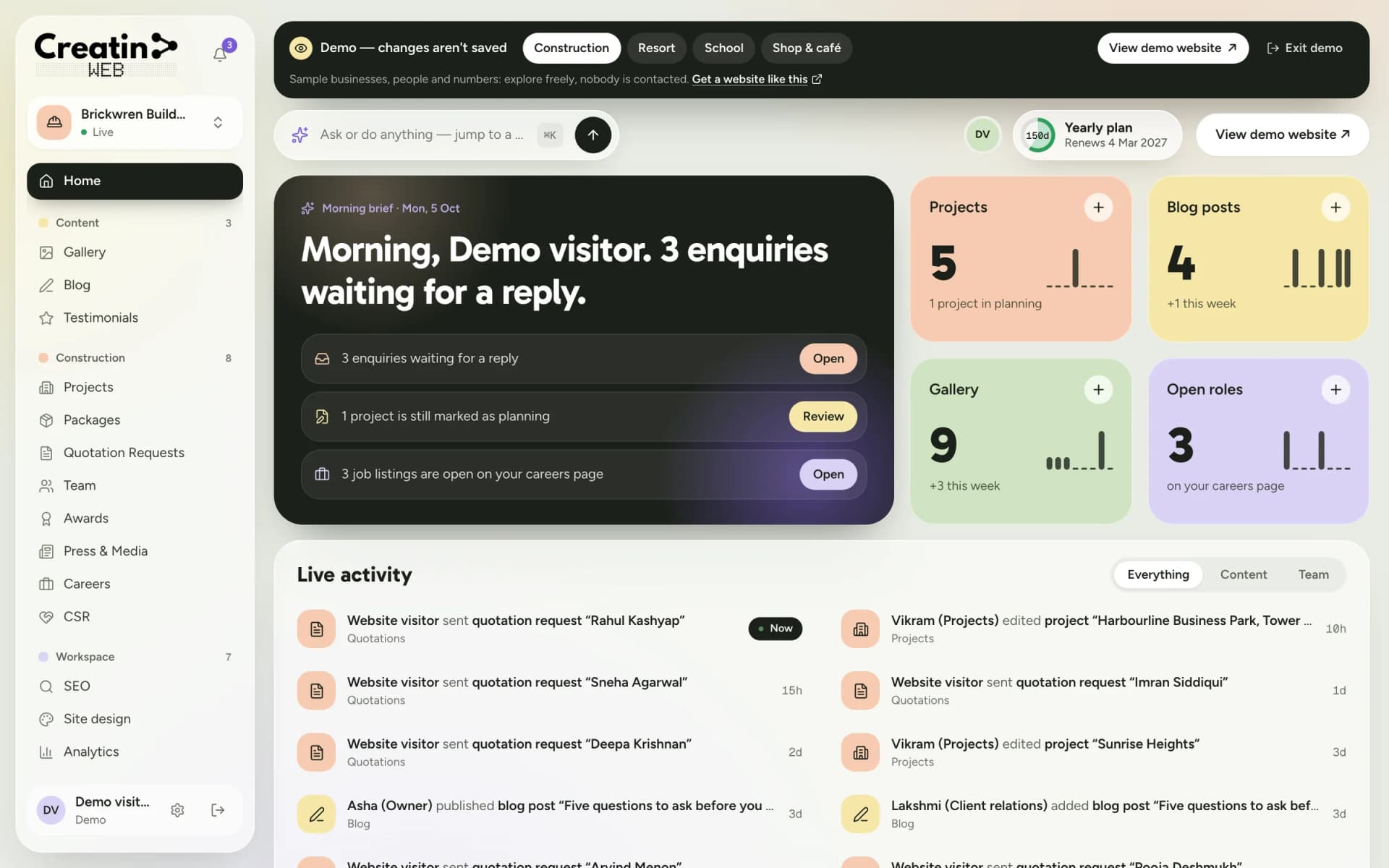
Creatin Web dashboard home for a construction company: a morning brief with three enquiries waiting, content counts and live activity

Editing

Update your website yourself, in minutes

Every part of your website that changes is a simple form in your dashboard. Fill in the fields, press save, and the change is live. There is no code, no page builder to learn and nobody to wait for.

Changes go live instantly

Save an edit and your website shows it straight away. No publishing queue, no overnight wait.

Forms, not code

A project has a name, a location, a status and photos. A room has a rate and a capacity. You fill in what you know.

Your order, with newest first

New items appear at the top. Reorder anything to put your best work first.

A home screen that tells you what to do

The dashboard opens with what needs attention today: enquiries waiting for a reply, a project still marked as planning, events coming up.

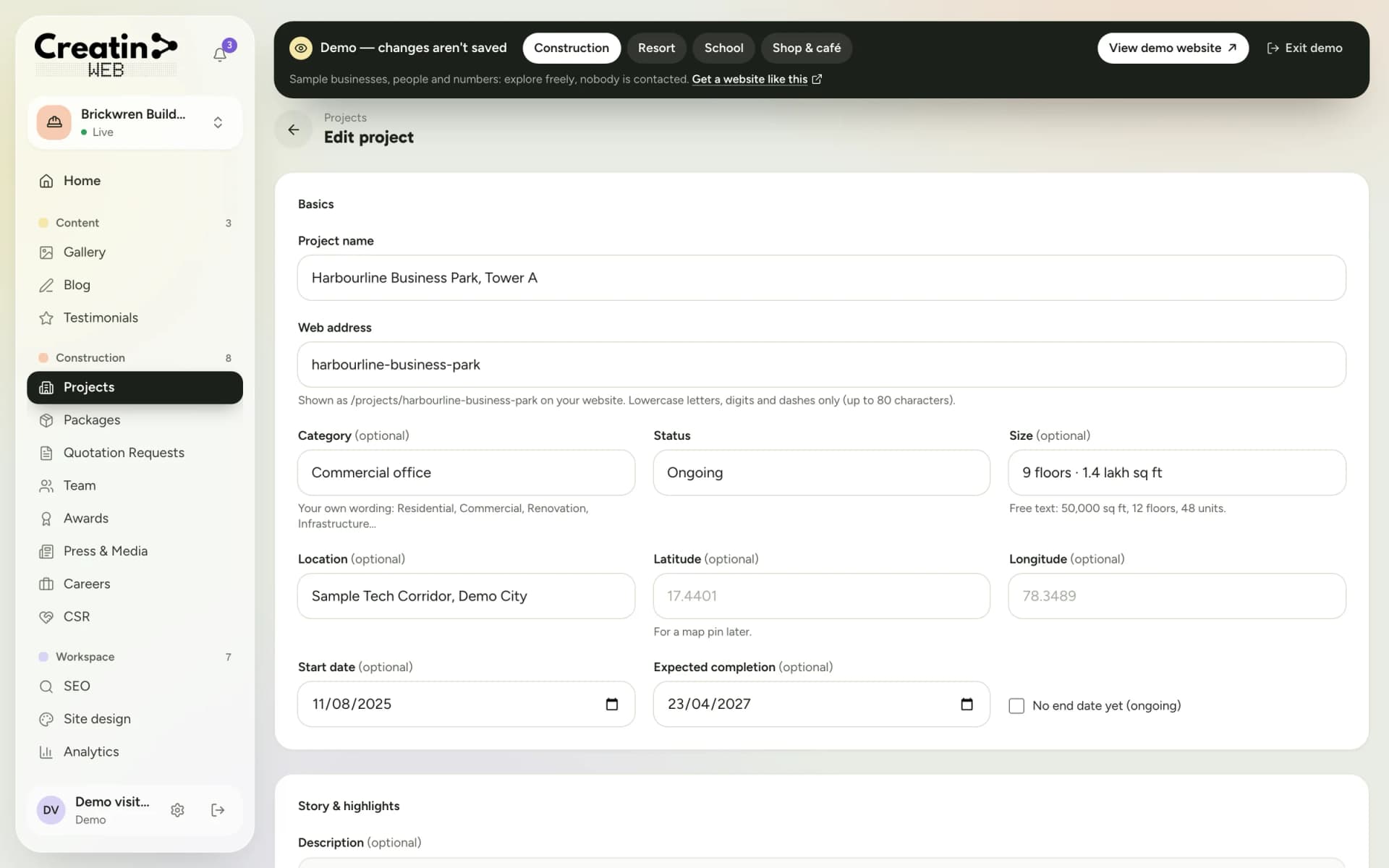
Editing a project in the dashboard: a form with fields for the project's details and photos
Editing is a form, not code: fill in the fields and save.

Content

Photos, articles and customer voices

Three sections every business gets: a gallery, a blog and testimonials. They keep your website fresh for visitors and give Google new pages to find.

Gallery

Upload a photo with a caption from your computer or straight from your phone's camera.

Blog

Write with headings, lists, links and images. Keep a post as a draft until it is ready. Each post gets a clean web address of its own.

Testimonials

Add a customer's words and rating, choose the order, and show or hide each one with a switch.

Google reviews link

Link your Google business and your website shows a "Review us on Google" button and a link to all your reviews on Google.
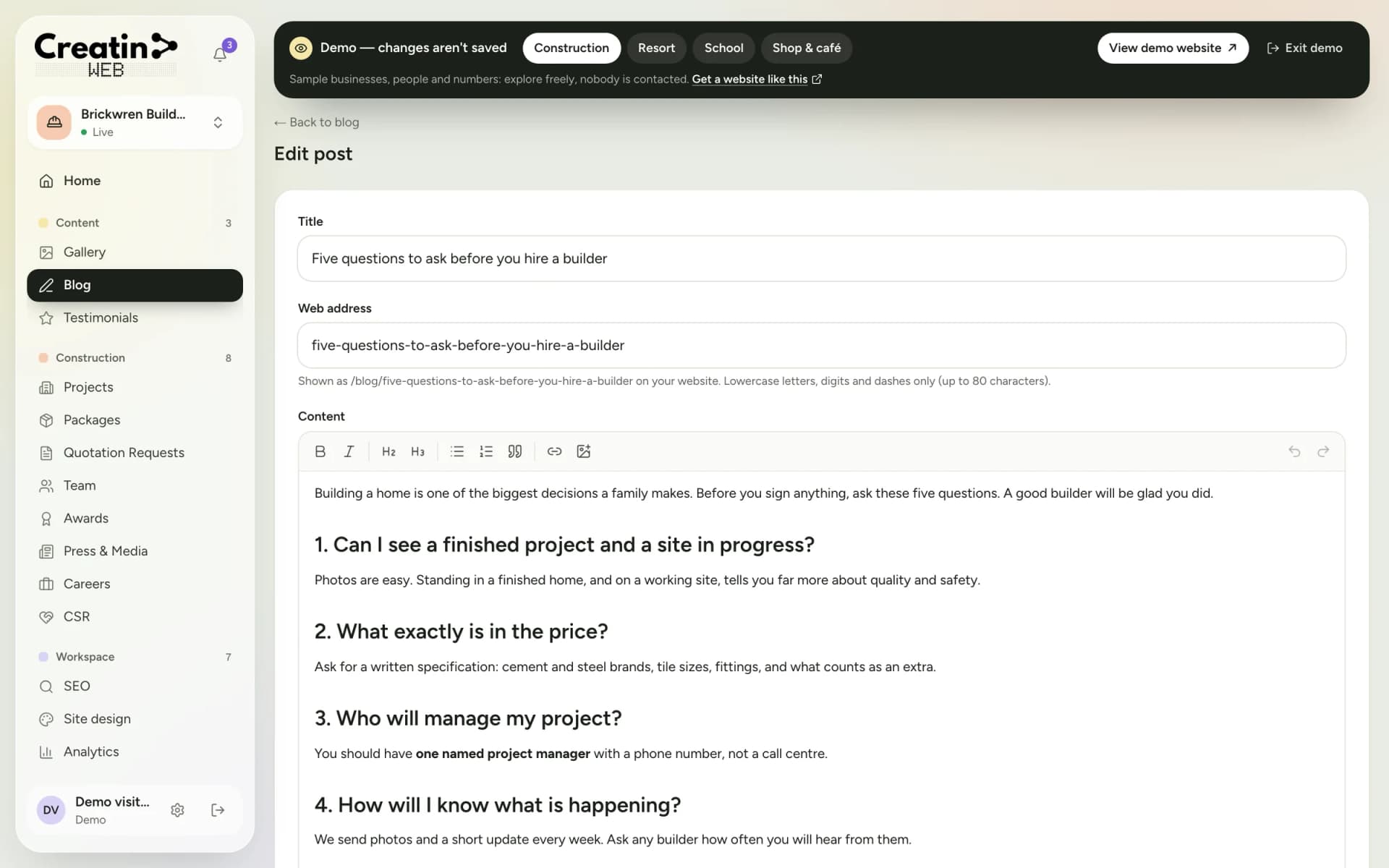
Blog editor in the dashboard with a title, web address and formatted article text
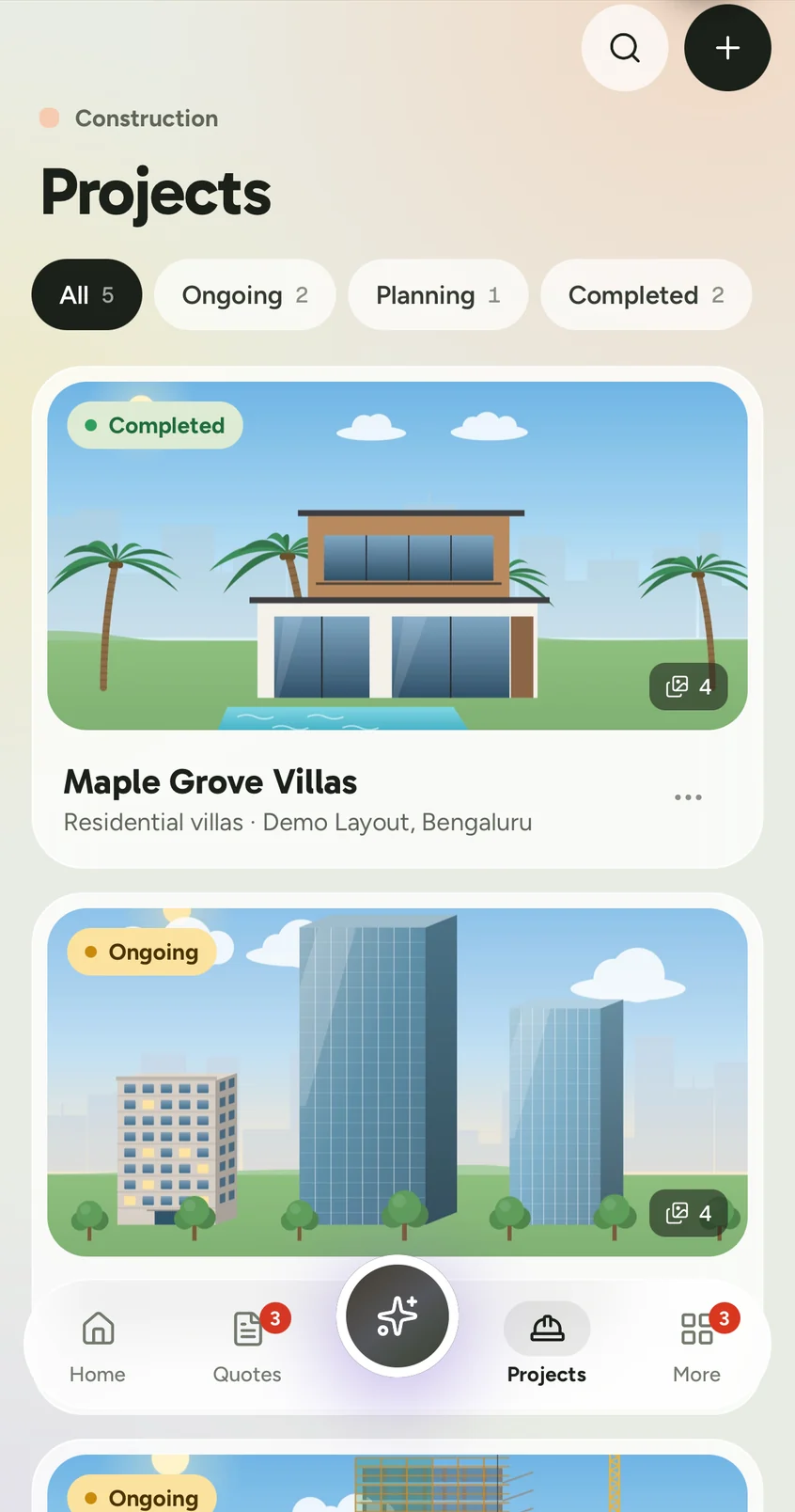
Projects in the Creatin Web Android app, shown as photo cards with a status on each
The blog editor: headings, lists, links and images, with a clean web address for every post.

Enquiries

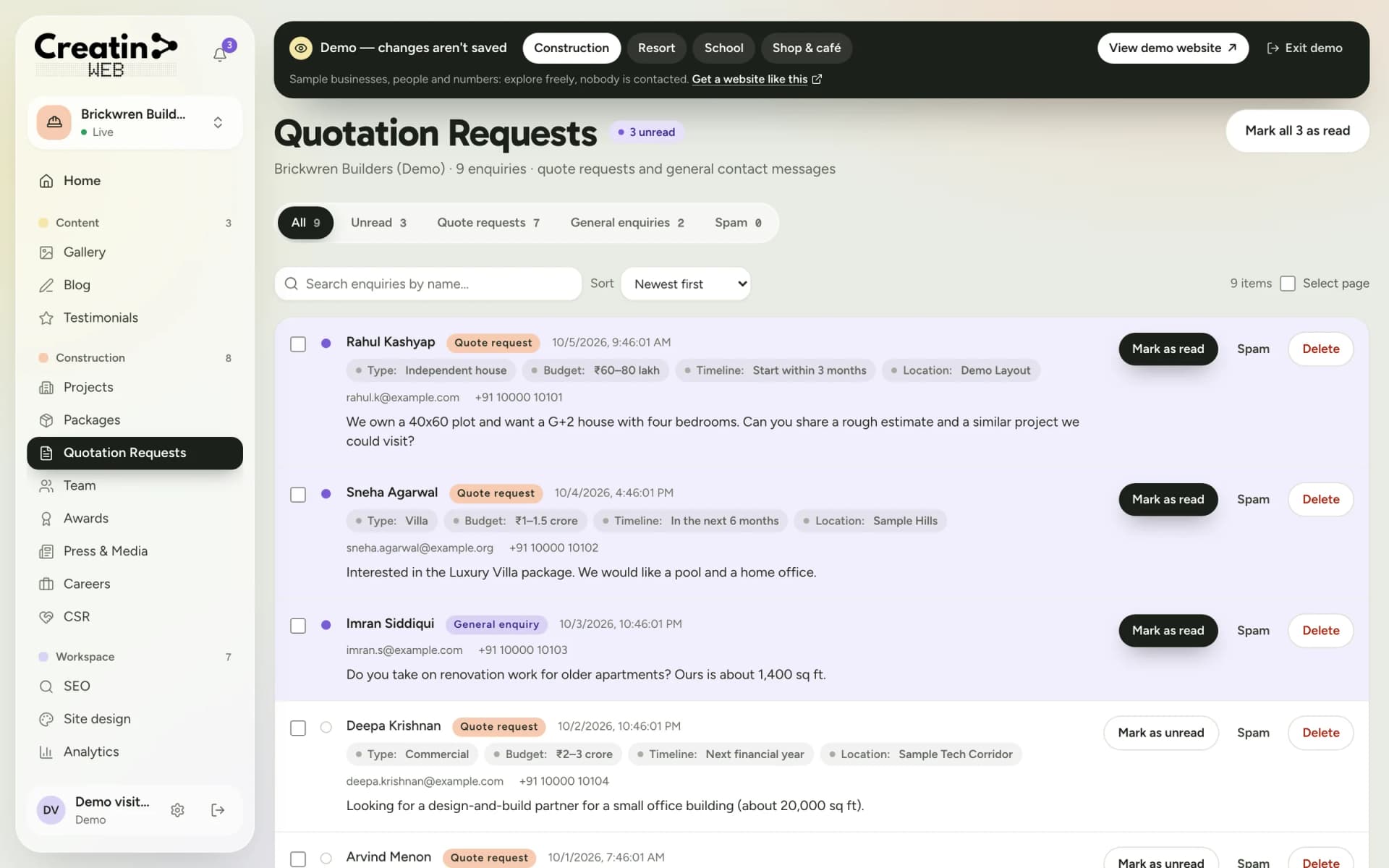
Every enquiry in one inbox, with a notification

The forms on your website are built for your kind of business, so an enquiry arrives with the details you need to reply: a builder gets the budget and the timeline, a resort gets the dates and the guests, a school gets the grade.

A notification the moment it arrives

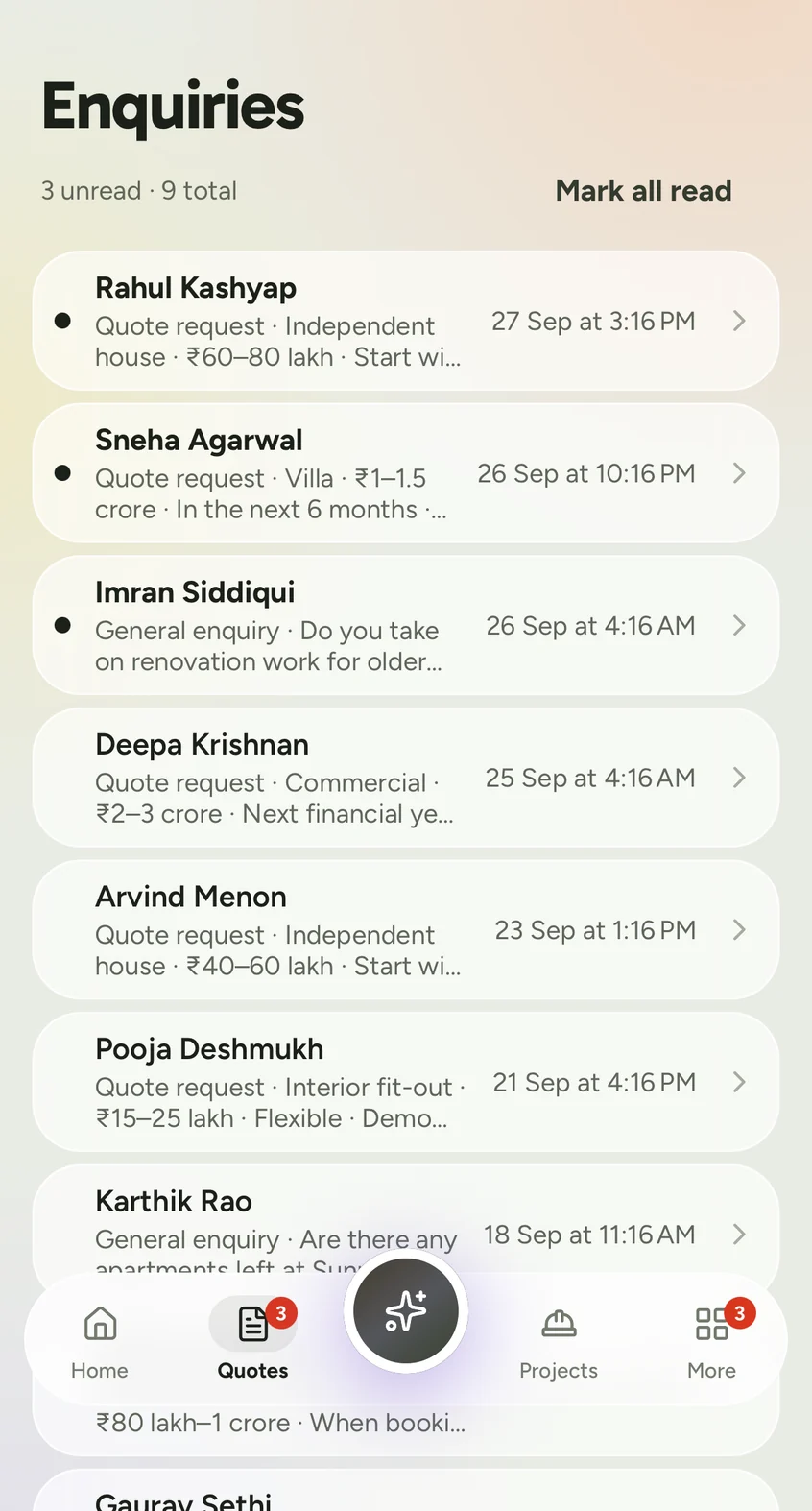
The Android app notifies you when a visitor sends an enquiry, so you can call back while they are still interested.

Read, unread, spam, delete

Unread enquiries stand out. Mark one as spam or delete it, one at a time or several together.

Details, not just a phone number

Each form asks the questions that matter for your business and shows the answers at a glance.

Protected against junk

The forms have built-in limits and checks that stop most automated spam before it reaches your inbox.

Quotation requests inbox showing each visitor's name, budget, timeline, location and message
Enquiries inbox in the Creatin Web Android app with unread quotation requests at the top
Quotation requests arrive with the plot type, budget, timeline and location already filled in.

Your team

Staff accounts with permissions

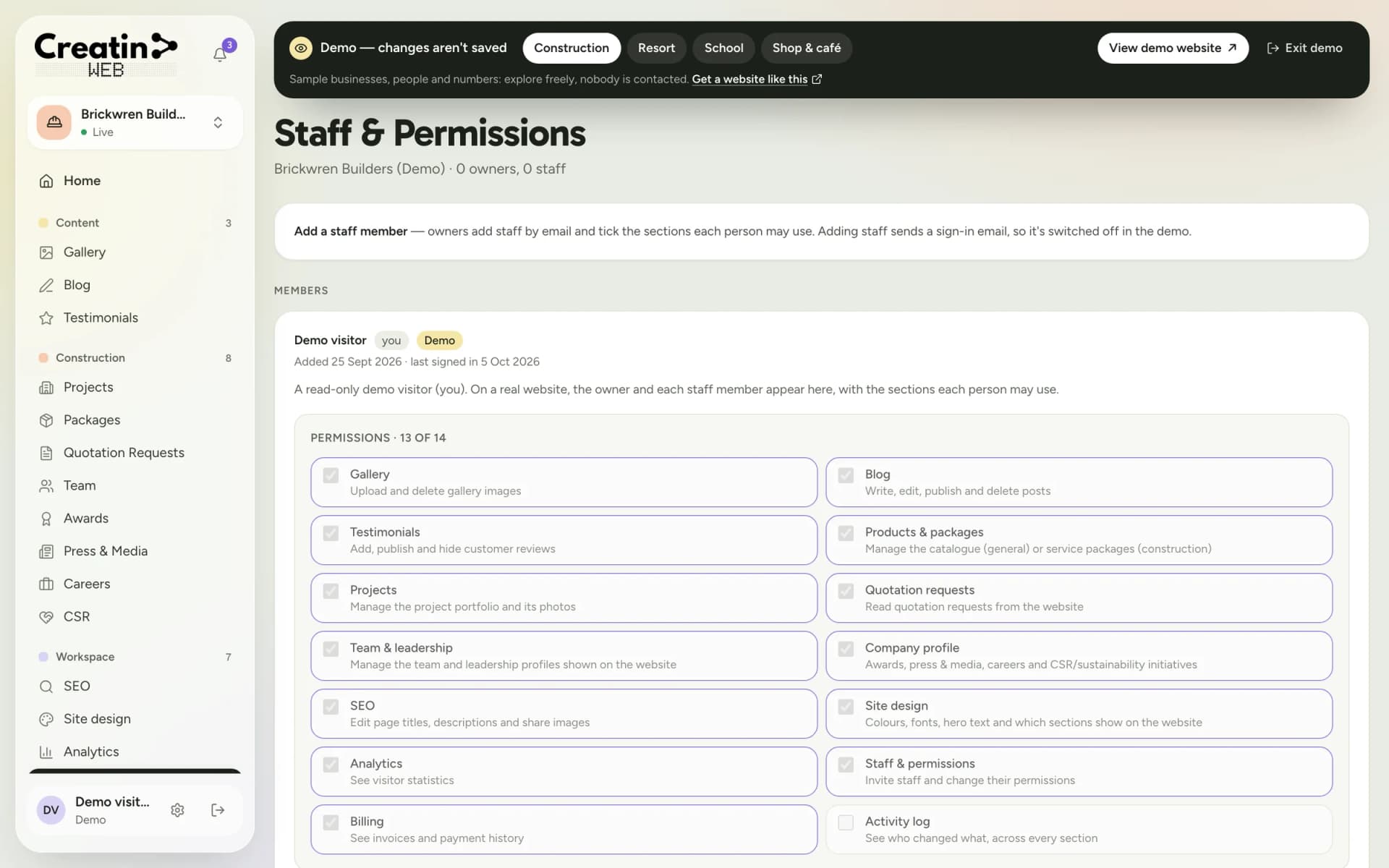
You shouldn't have to share one login with the whole office. Add each person by email, tick the sections they may use, and remove them when they leave.

Access section by section

Gallery only for the photographer, enquiries only for the front desk, everything for your manager.

An activity log

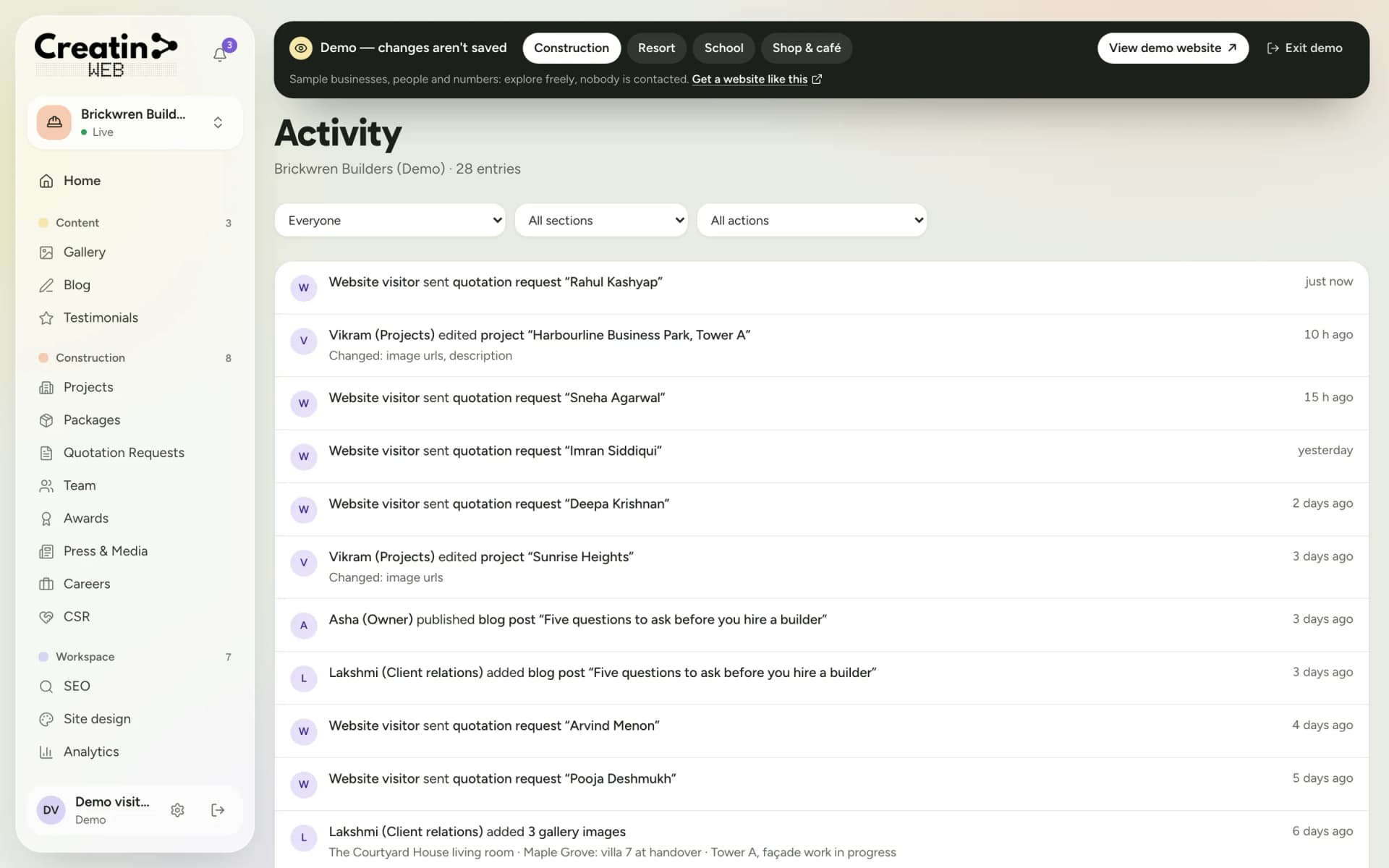
See who changed what, and when: every edit, upload and reply is listed.

You stay in charge

As the owner, you decide who is added, what each person can do and who is removed.

Staff and permissions section with a tick box for each section a staff member may use
Staff & permissions: tick the sections each person may use. Nothing else is visible to them.

Being found

SEO controls and analytics

Your website is built to be found: sitemaps and structured data come as standard. The parts only you can write, you control yourself.

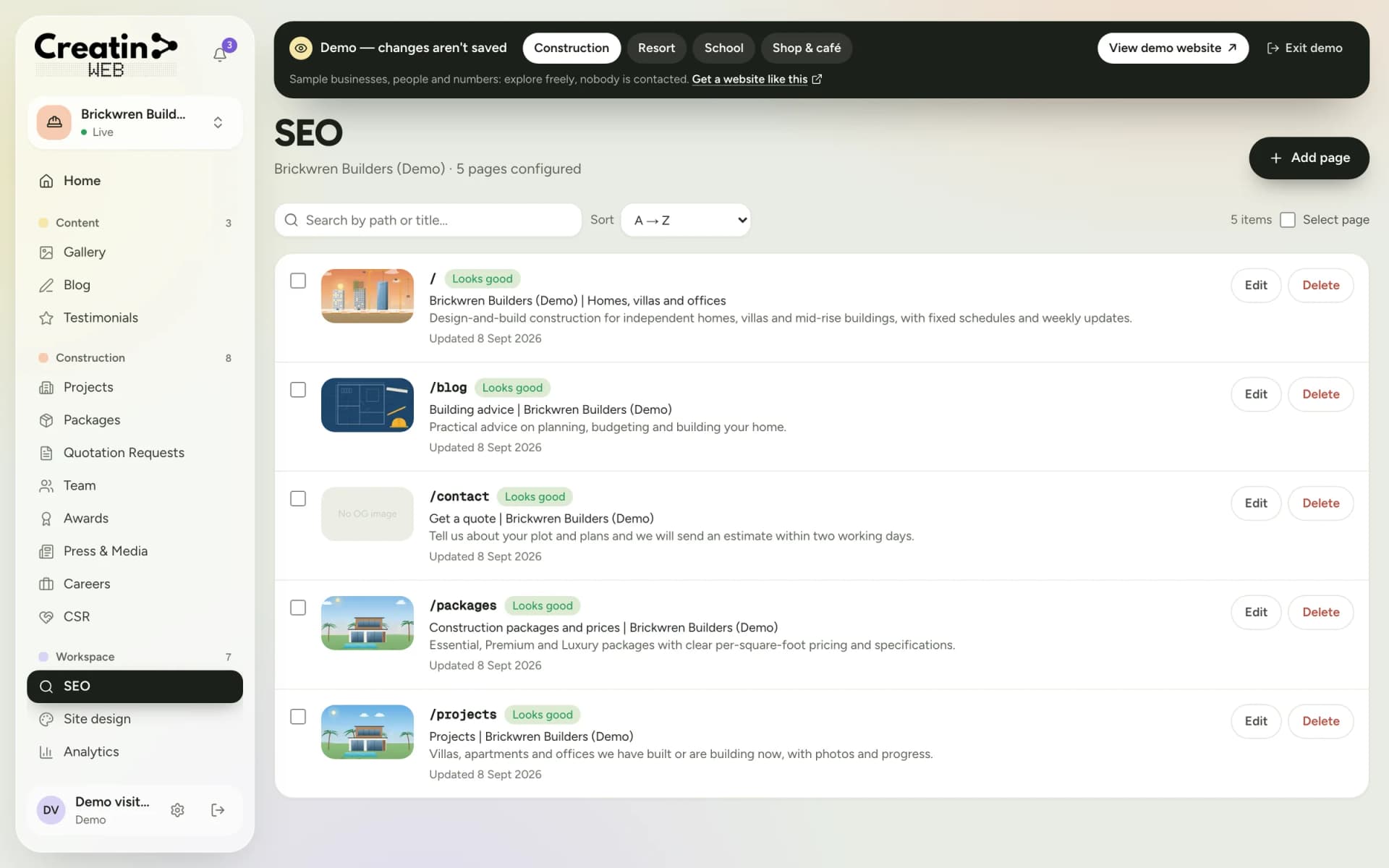
A title and description for every page

Write what Google should show for each page, and choose the image that appears when the page is shared on WhatsApp.

A check that says when it's right

Each page shows a "Looks good" mark once its search details are in order.

Visitor numbers you can read

Page views, the daily average, your busiest day, your most-viewed pages and how many enquiries came in.

SEO section listing each page of the website with its title, description, share image and a Looks good check
SEO: set the title, description and share image for each page, with a check that tells you when it looks right.

Design

A design made for you, that you can still adjust

We design your website for your business. Afterwards, the choices you might want to revisit stay in your hands: colours, fonts, the home-page banner and which sections show.

Your colours and fonts

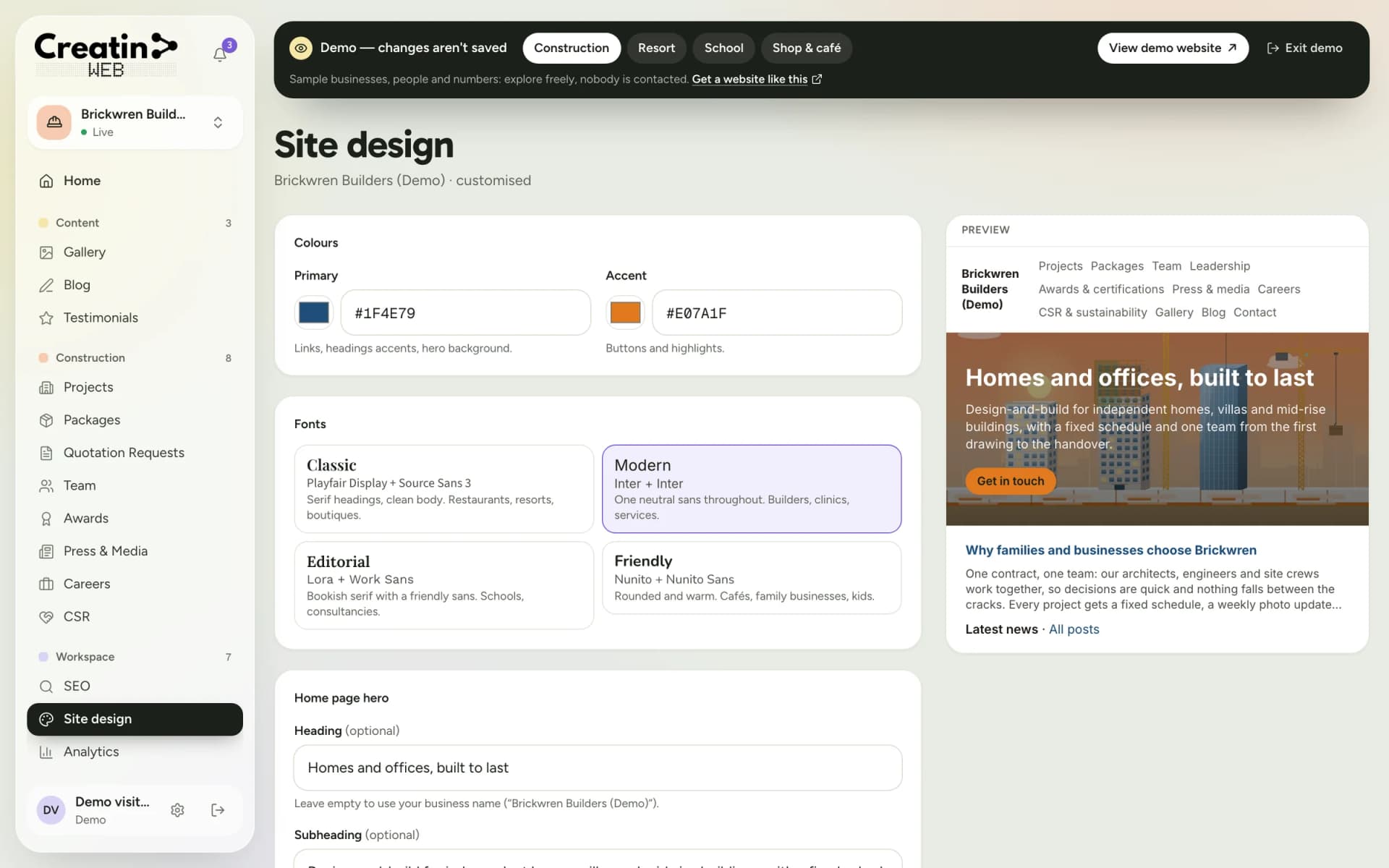
Pick your primary and accent colours and one of four font pairings, and see the result in a live preview.

Your home-page banner

Change the headline and the supporting line whenever your message changes.

Sections on and off

Hide a section you aren't ready to show, and bring it back when you are.

Site design section with colour pickers, four font pairings and a live preview of the website
Site design: colours, fonts and the home-page banner, with a live preview beside them.

Security and language

Secure login and Indian-language support

Signing in takes a one-time code sent to your mobile number, or your Google account. There is no password, so there is nothing to forget, reuse or leak.

Mobile OTP or Google

The same sign-in works on the dashboard and in the Android app.

Accounts are created for you

There is no public sign-up. Your account is set up when your website is, and staff join only when the owner invites them.

Kannada and other Indian scripts

Type your content in Kannada or any other Indian language, and it shows correctly on your website.

Activity log listing who changed what on the website and when
The activity log: who changed what, and when.

Paperwork

Quotations, invoices and renewals

Before any work starts you receive a written quotation with your yearly plan and what is included. After that, your billing page keeps everything in one place.

A written quotation first

You know the full cost and the scope before you pay anything.

Invoices in your dashboard

Every invoice and payment is listed on your billing page.

One yearly plan

The yearly plan covers the design and build, your domain, hosting, maintenance, support, the dashboard and the mobile app; no setup fee. You see the renewal date in the dashboard, and can pay online by card, UPI or net banking.

Creatin Web dashboard home for a construction company: a morning brief with three enquiries waiting, content counts and live activity
Your dashboard home: what needs attention today, and what your team has changed.

Android app

All of it, from your phone

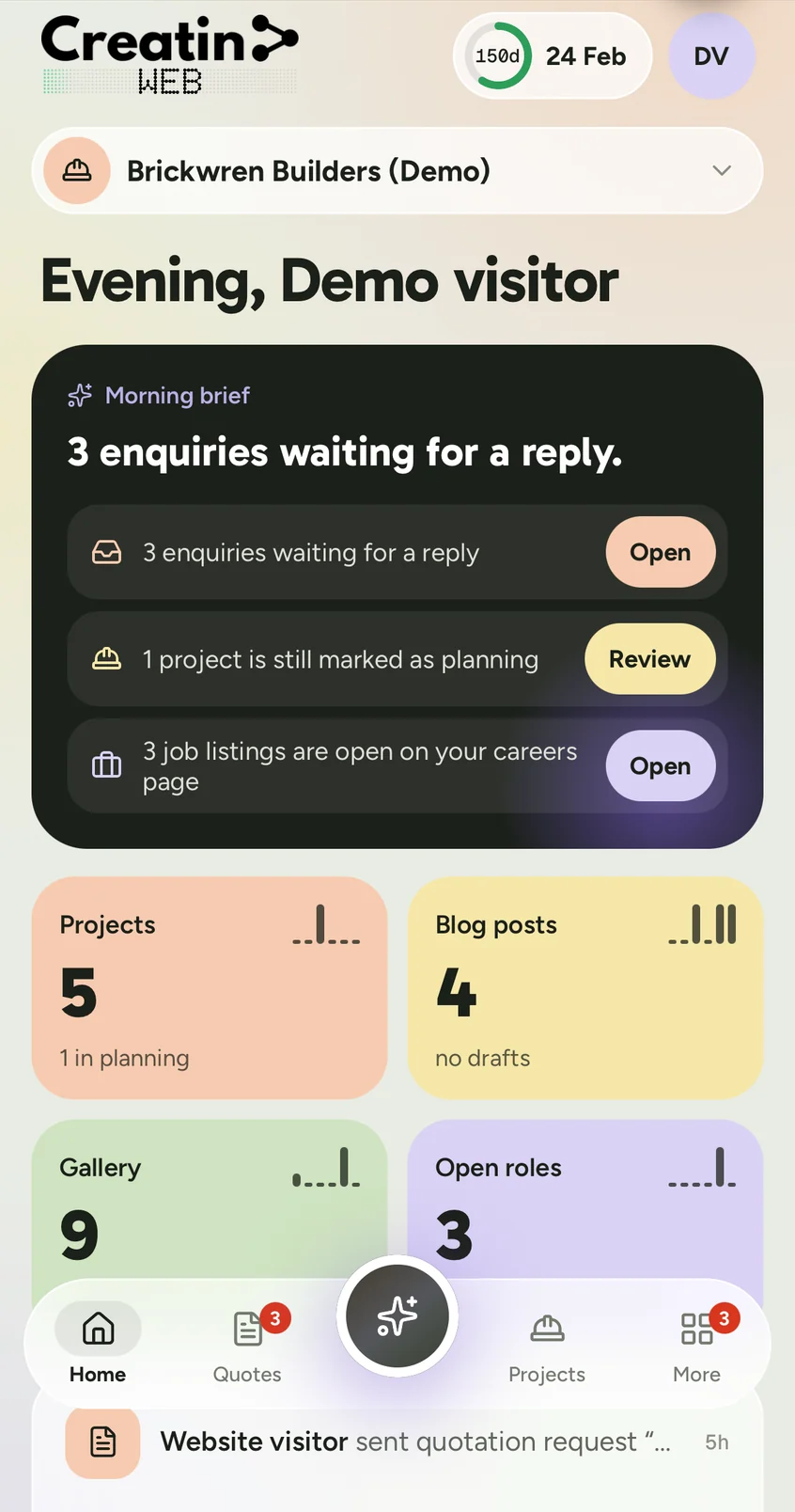
The Creatin Web app does what the dashboard does: edit your content, add photos straight from the camera and read enquiries, with a notification when a new one arrives.

Creatin Web Android app home screen: a morning brief with enquiries waiting and counts for projects, blog posts and gallery
Projects in the Creatin Web Android app, shown as photo cards with a status on each
Enquiries inbox in the Creatin Web Android app with unread quotation requests at the top

Questions

Questions about the features

Is this a website with an admin panel?

Yes. Every Creatin Web website comes with an admin panel, which we call the dashboard, and an Android app that does the same job from your phone. You use them to update your content, read enquiries and manage your staff.

Do I need technical knowledge to use the dashboard?

No. Editing is filling in a form and pressing save. If you can use WhatsApp and fill in an online form, you can keep your website up to date.

How quickly do my changes appear on the website?

Straight away. When you save a change in the dashboard or the app, your website shows it immediately.

Can I try the dashboard before deciding?

Yes. The live demo opens a read-only dashboard for a sample builder, resort, school or café, with no sign-up. You can look at every section; changes in the demo are not saved.

Is there an iPhone app?

The app is on Google Play for Android. On an iPhone, iPad or computer, the dashboard works in the browser and does the same things.

Does every website get every feature?

The sections of your website are chosen for your business and set out in your quotation. A resort gets rooms and booking enquiries, a school gets notices and admissions, and so on.

The screenshots show the dashboard and the app with sample data: the businesses, people and numbers in them are not real.

Free consultation

Tell us about your business

No obligation and no sales script. We listen first, then put a price in writing.

  1. We get in touch to understand your business and what the website should do.
  2. You receive a written quotation: your yearly plan and what is included.
  3. If you go ahead, we design and build your website and hand you the dashboard and app.

We use these details only to reply to your request.

Get a free consultation